Showing posts with label tips. Show all posts

Tuesday, November 15, 2011

Tip: don't buy ink cartridges for your inkjet printer, refill your own at home in minutes!


Everyone already knows they are getting ripped off buying new ink cartridges.  What I didn't know was how easy and inexpensive it is to refill your own.  I am using an hp 60 black ink cartridge that ran completely dry:
The tables used color ink since they were scanned
Using my kit on a paper plate I added 9 ml of ink all over inside my hp60 black cartridge.  The cartridge has foam to hold the ink, and the syringe needle pokes down in it through a hole in the top.  To expose the hole, remove the label, which doesn't have to be replaced when done.  Ink will leak from the bottom of the cartridge, just dab that on a paper towel until you have cleaned off the excess:
Only the first 2-3 dabs cleaned excess, the rest are normal
Then, replace the cartridge in your printer and try it out.  My kit told me to wait 8 hours for the sponge in the cartridge to saturate, injecting the ink in different parts of the sponge to begin with expedites the waiting period. I printed immediately:
Same document as before
The best part, a $15 kit will fill your cartridge 60 times!  Ya, we are getting ripped off by the printer manufacturers. This $15 refill kit is specifically for inkjet and deskjet printers and will save you hundreds before it is gone:

Amazon.com 600 ml HP Printer 920 XL 564 XL Cartridge Ink Refill Kit Color & Black with 4 refill syringes

Friday, October 14, 2011

No coupon code? Find one yourself!

Shopping online can be a great way to find great deals, as well as avoid paying your state sales tax up front.  Whenever I use a new online retailer I read reviews for that retailer using Google and I check for coupons online.  Most of the time there is a coupon that applies to my order which saves me $5-10.  My favorite site to use when searching for coupons is RetailMeNot.  Next time you are checking out and see a box for "promo code" or "coupon code" remember this and give it a shot!

Thursday, September 29, 2011

The new Kindle is here, faster and less expensive

Kindle is the original and best portable e-reader.

You now have 4+ options when purchasing Kindle:
I have linked you to the new Kindle touch $99. (Out Nov. 21st)
The exciting new Kindle fire (color touch screen, Android based) $199. (out Nov 15th)
New style non-touch Kindle $79. (out now)
Kindle keyboard (what you are used to seeing) $99.

These prices include "special offers" and Amazon sells them for $20-$40 less. This means you will be looking at ads on your home screen and screensaver.  Buy the special offers version and if the ads bother you, it is possible to pay the difference to remove them right on your kindle using your Amazon account.

Click below to see all the options for yourself:

Kindle Touch, Wi-Fi, 6" E Ink Display - includes Special Offers & Sponsored Screensavers

Tuesday, August 23, 2011

Solar LED Spotlight set of 3 $35


I just put this in on our berm and it looks amazing! It works because the lights are LED and put out a lot more light with less power. They do have to be placed directly in front (within a couple feet) of whatever you are lighting up to be effective. I lit up our 2 Cypress Boulevard Pom Pom trees, and a couple sandstone rocks. Needs 8 hours of daylight on the solar panel. Lights can be placed up to about 6 feet from the solar panel, and 6 feet from each other. These are generally $20 and up, so 3 quality lights for $35 is a steal.

Moonrays 92460 Solar Spotlight 3-Pack with Remote Panel/Switch, LED is 8X-Brighter

Monday, August 22, 2011

Boot to Chromium OS from a USB drive

Chromium OS boots extremely quickly and makes Google Chrome your operating system instead of, for example, Windows.  Since this is done from a USB drive, just remove the drive and restart your PC if you want back into Windows like normal.  A 2GB or larger USB drive is required.

Download and extract Win32diskimager.  This works without being installed and is used to write Chromium to your USB drive:
win32diskimager-RELEASE-0.3-r27-binary.zip

Download Chromium OS from this page, use the first USB image download link (it includes drivers and a built in updater):
http://chromeos.hexxeh.net/

You will need to have a program installed like 7zip or winrar; extract the gz file to tar, and the tar file to img.
http://www.7-zip.org/


Then run win32 diskimager and write the Chromium image to your USB.  This will erase all data on the USB.  Now boot your computer (or any) from the USB to use Chromium!

The first time you login you have to use the following credentials
username: facepunch  (@gmail.com will appear automatically, this is fine)
password: facepunch
Once you get connected to the internet, restart and use your regular Google login.

Right now my laptop will not open addresses that start out with https:// in Chromium for some reason, sounds like most people don't have any problems.

Tuesday, August 16, 2011

Sony PS3 price drop effictive immediatly, now $250

At the new price of $250 (was $300) the PS3 is arguably the best gaming deal out there, plus it has great multimedia capabilities including Netflix and Blu-Ray.

PlayStation 3 160GB System

Monday, August 8, 2011

Free Android phone app every day on Amazon marketplace

screenshot of my Amazon Android app page
Once you install the Amazon marketplace app on your Android phone you get access to apps you can't get on Android marketplace like Peggle.  Every day there is a free app, such as Peggle or Angry Birds (ad free).  You can "purchase" the free app on your computer, and download it to any Android phone anytime later.  It really is better than the Android marketplace.  Bookmark the free app page and start building your Android app collection for free.

right click and hit "bookmark this link"
 Click here to see the free Android app of the day on Amazon Marketplace

Friday, July 22, 2011

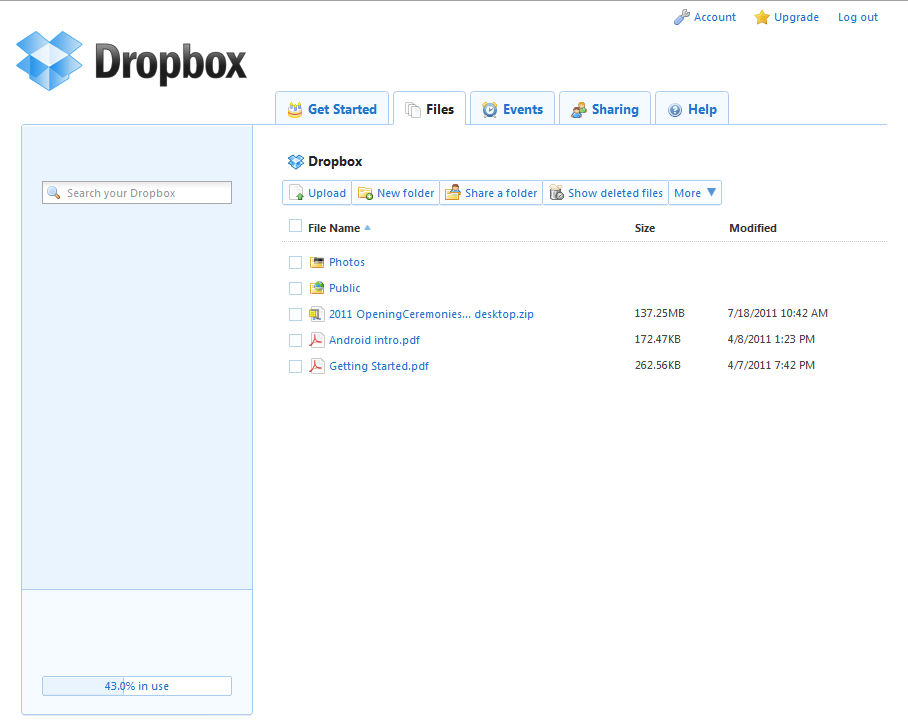
Dropbox: Back up your documents automatically for free


If you want to be able to access files on your computer from anywhere that has internet access, you need to install Dropbox. I just installed it on a company's PC, moved the company financial records into the Dropbox folder and now the records are always backed up securely online. They are backed up automatically every time the user clicks save in the financial software they are already using.

The best part, Dropbox is free (for 2GB storage.)

Dropbox folder on PC
Dropbox is easy to use, just put files you want to backup in the Dropbox folder, and you are done. To access the files from a different computer, go to the Dropbox website and login. To share a file with someone else, put it in the public folder, right click, and select Dropbox-copy link location. Now you can paste the link in an email, they just click and download. Their download comes from the Dropbox server, so it will always be fast, even if your internet isn't.  See if this picture that is in my public Dropbox folder on my personal PC loads fast enough for you.

Dropbox.com logged in

The Dropbox folder and Dropbox.com account are automatically synced at all times.  The online account saves deleted files in case you want to recover them later.

click here to visit www.dropbox.com! (opens in new tab)

Monday, July 18, 2011

Netbooks, cheaper, more portable and better battery life

Wish your laptop were smaller?  My wife sure hates carrying my huge clunker around.  Netbooks are mini laptops with no optical drive.  Optical drives hardly get used anymore anyway.  The main drawback is they will try to put Windows Starter edition on them, which is not desirable (for example you can only have 1gb of ram and you can't customize your background, among other things).  This one, however, has a Windows 7 Home Edition, 2gb ram and a 1080P HDMI out. Click here to see the page with the best price


Saturday, July 16, 2011

Ray gun alarm clock

Can't promise this is actually a good clock, but it is a cool idea. Who doesn't want to shoot their alarm clock in the morning? May be good for kids:


Silly promotional video:

See it in action, including gun kickback:

Sunday, July 10, 2011

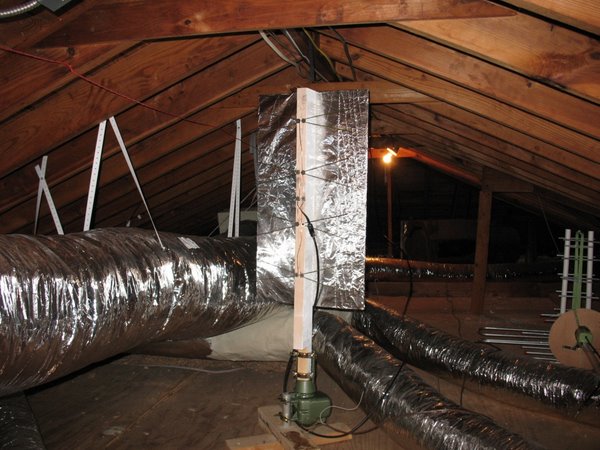
DIY: build your own HDTV coat hanger antenna for $7

  
This was easier to install than it was to photograph

It gets better reception than a store-bought antenna ($30-$120), plus it fits easily in the attic and doesn't require any power!

I thought about doing my own instructions, but these instructions are great. I used them. Spent under $7 building it. I already had what I needed except the antenna adapter.
http://uhfhdtvantenna.blogspot.com/


Everything you need is available at Home Depot, Lowe's, Ace, etc.


Materials you will need:

Tools you will need:
Once it is all built, hook it up and slowly spin it around to find the best angle for signal strength.  Screw it into your attic 2x4s, run some wire and enjoy a strong signal without paying more for an inferior antenna.

    Netflix, Pandora and more in 1080P to your TV with Roku (Starting at $69.99)

     
    Roku is the highest rated and best value in set-top boxes for watching media from the internet and your PC on your TV, in high definition.

    For under $20 a month you could subscribe to Netflix and Hulu Plus to watch almost anything you want, whenever you want, and cancel your cable or satellite subscription.  These services are updated with new TV shows and movies constantly. Click below to see the listing of all currently available apps:
    http://www.roku.com/roku-channel-store

    The Roku box also plays your computer media libraries (like .mp3, .mov, .mkv, not .avi) over the network or attached hard drive or thumb drive.  This includes photos and home videos.  This article shows all compatible file types:
    http://support.roku.com/entries/423946-what-media-file-types-does-the-roku-usb-media-player-channel-support

    To connect to the internet, Roku uses a cat5e cable (the same kind your PC uses), but what sets Roku apart is that it also includes wireless, at prices that normally won't buy you this feature.

    Roku 2 XS 1080P (Now compatible with every hookup except optical audio)


    Roku 2 XD 720P (wireless connection only)


    Roku 2 HD (best value)


    Roku XDS (compatible with any internet, TV and audio hookups)


    Roku XD


    Roku HD (not recommended at this price)


    Click image to enlarge (opens in new tab):


    If wifi isn't important to you, and .avi support is, then you want WD TV Live instead:


    Less apps, more Blu-ray, still does Netflix:

    Monday, July 4, 2011

    Too many remotes? Get one that does it all with ease

    I am talking about Logitech Harmony remotes.  Even my wife can control our TV with one of these.  If you have more than just rabbit ears hooked up to your TV, you will enjoy having a Harmony remote.

    One of these remotes can replace all remotes in one room.  We use the Harmony One remote (pictured above).  The magic of Harmony remotes are how they are organized into activities.  Once programmed you simply push, for example, "watch tv" and it turns on the tv,  satellite receiver, audio receiver and tunes them all to the correct input.  Then the channel and menu buttons control the satellite, the volume buttons control the receiver, and the power button turns everything back off, all on one remote. While in the "play Xbox 360" activity, the same buttons will now control the TV, receiver and Xbox.  Nobody ever regrets purchasing a Harmony.

    As an example, we have the following devices:
    -TV
    -audio receiver
    -satellite receiver
    -Xbox 360
    -Wii
    -media PC

    Activities programmed into our Harmony are:
    -Watch Satellite TV
    -Use Xbox 360
    -Use media PC
    -Watch Broadcast TV
    -Use Wii
    -Use front input
    -Listen to radio

    The Wii and PC don't have infrared ports, so they have to be turned on and controlled their normal way.  We still don't have to remember their inputs and we do use the remote to control the volume.

    Programming is done using the included Logitech software and an internet connection.  Devices you have are selected and the software goes through a wizard to help you set up the activities.  This will be the last time you (or your frustrated spouse) have to remember which inputs are required on your TV and receiver, and the other remotes can be put away. Any button on the remote can be customized to send any signal to whichever device is appropriate, but the software wizard will create activities that are fully functional automatically.  "Soft buttons" are located next to the screen so it can be programmed to display the name of those buttons, which can include multiple pages to control any and all functions desired.

    New electronics generally have more control options than are even available on your included remote.  For example, our TV remote has a "next input" button, but the Harmony remote has the ability to switch it directly to any input it wants, from whatever input it is on. It will switch it from "TV" straight to "HDMI2," for example, if the activity you choose requires that. Also, if the TV is already on the remote will send "power on" and the tv won't do anything.  An older TV will not function perfectly with the Harmony remote, and the below compatibility website will tell you this.  If your TV can be mounted on a wall, it is probably Harmony ready.  The Harmony remote uses the infrared receivers your devices already have.  An infrared repeater can be used if all your devices aren't in the same location in your room (not required).

    Click below to use the website Logitech created to show you how compatible your devices are before you buy a Harmony remote: (this is the same device list you will use to program the remote.)
    Look up your compatibility:
    myremotesetup.com


    Do yourself a favor and click below to treat yourself a Harmony remote, for $40-$90 less than retail.  Sometimes a lower end, fully functional Harmony is available for $35, I'll keep an eye out.  The Harmony remotes without a screen do not function like this article has described, they cannot be programmed with activities.

    Harmony 650- Color screen, $59.49


    Harmony 700- rechargeable with a USB cable $78.33


    Harmony One- Touch screen, rechargeable with a USB cable or included cradle $156.52


    Infrared repeater (not required) $34.95

    First things first: Cables


    Never buy your audio/video cables from the local retailer you just bought your TV or Blu-Ray player from.  Sometime I am going to set up a stand outside a big box retail store just to sell cables for $6 while they are trying to sell them for $35-$100 inside.  Check out these deals (and customer reviews) on common 6 foot TV cables, all for $4 or less:

    Inputs on TV and/or receiver:
     

     HDMI: Video and audio
    up to 1080P HD


    Component: Video only shown, audio seperate
    up to 720P or 1080i HD


     Composite: Video and audio, not HD


    Click to shop affordable cables:

        HDMI:

       Component:

       Composite: